Cloud Print Management: Printix
Simplify cloud print management and reduce costs by making the switch to Printix Cloud Print.
Now Available: Printix 2026.3 – SCIM-Synced, AI-Compliant, Expanded Clientless Enterprise Print
Secure, Compliant, Flexible Print for the Distributed Workplace
Printix, a cloud-agnostic SaaS print management platform, empowers modern enterprises to unify and simplify print and capture workflows without cloud lock-in, print servers, or VPNs. Eliminate the need for on-premises print software and enable secure, direct printing from any ERP or business application, across public, private, or hybrid clouds. With seamless S3-compatible integration, Printix supports regional compliance, cost control, and full data residency, letting employees print anywhere, to any printer, while IT retains complete visibility and control.
Flexibility and Scalability

- Hybrid cloud print management that integrates seamlessly with cloud, on-premise, and private cloud environments.
- Easily adapts to organizations of all sizes, allowing IT to manage multiple locations and remote workers without additional infrastructure.
Hybrid Cloud Enablement
- Cloud-enables existing on-premise third-party print solutions.
- Modernizes legacy systems without needing a full replacement, reducing disruption while offering cloud-based control.
Reduced Cost and Complexity

- Eliminates the need for physical print servers and VPNs.
- Lowers operational costs and IT overhead, simplifying the overall management of print environments.
Ease of Use for End Users

- Intuitive interface for printing from any device, anywhere - whether in the office or at home.
- Reduces frustration and helpdesk calls, enabling employees to print effortlessly and boosting productivity.
Ease of Use for IT Admin

- Centralized control with automated print driver management and real-time analytics.
- Minimizes IT workload by automating manual processes, allowing IT to manage everything from a single dashboard.
Security and Reporting

- Zero Trust Architecture with encrypted print jobs, centralized reporting, and audit trails.
- Ensures compliance with industry standards like GDPR and HIPAA, providing full visibility into print activity to any print device.
Tungsten Copilot for Printix
This AI-driven assistant streamlines administrative tasks, enhancing ease and efficiency for IT admins.
-
Guided Setup and Management: Provides assistance for subscription management, user roles, site and network additions, and setting up analytics.
-
Enhanced Authentication Options: Enables secure authentication setups with multiple provider options, including Microsoft Entra ID, Google, and Okta.
-
Workflow and Support Automation: Simplifies workflows by assisting with printer discovery, capture workflows, cloud storage integration, and submitting support requests with configurable details.
Printix : Hybrid Cloud Print Enabler
Printix enables seamless public cloud print integration across both on-premise and private cloud print management systems. Together, these solutions provide businesses with the flexibility to unify their print infrastructures, including remote and home-based employees. With Printix’s cloud-native features, you can enable secure home printing and remote printing anywhere, from any printer, within the scope of print management reporting and audits trails. This integration simplifies print management, streamlines workflows, and reduces reliance on physical infrastructure while maintaining regulatory compliance for print reporting audit trails.
Key Benefits:
-
Hybrid Cloud Flexibility: Easily manage both cloud and on-premise print environments, ensuring smooth transitions during infrastructure changes like mergers or expansions.
-
Simplified Print Management: Printix automates printer discovery, driver management, and user provisioning, while ControlSuite provides advanced feature set for specialized print and capture workflows.
-
Security and Compliance: With Zero Trust Architecture and centralized reporting and audit trails, ensure compliance with regulations like GDPR and HIPAA across both local and remote print environments.
-
Cost Reduction: Eliminate costly print servers and reduce infrastructure maintenance by leveraging Printix’s serverless architecture, while still supporting existing on-premise solutions in a single cohesive solution.
Together, ControlSuite and Printix offer a powerful hybrid cloud solution that simplifies print management, enhances security, and provides a flexible, scalable solution for modern enterprises,
Why customers choose Printix

True Cloud Solution
Printix delivers a fully managed cloud-native print platform. There’s no need for additional services or complex on-premises infrastructure dependencies, offering a simple, scalable solution.

Hybrid Cloud Flexibility
Printix brings cloud functionality to legacy on-premise and private cloud print systems, offering seamless integration with cloud-based management. This makes it an ideal solution for businesses looking to unify print infrastructures, especially during mergers and acquisitions, simplifying integration and providing centralized control.

Reduce Costs with Simplified Infrastructure
By eliminating the need for on-premise print servers, Printix significantly lowers infrastructure, support, and maintenance costs. IT teams benefit from a cloud-managed print infrastructure that’s easy to scale and maintain.

Improve Employee Productivity
Printix optimizes print operations through automatic printer discovery and intelligent print driver management. Employees benefit from flexible, easy access to print from any device, to any printer - including home printers - while IT maintains control with centralized reporting and compliance tracking.

Quick Time to Benefit
With cloud-native deployment and automatic updates, Printix delivers a quick SaaS onboarding experience. No installation or complex configuration is required, ensuring customers always use the latest software without manual interventions.

Simplified, Centralized Administration
Manage printers from a central dashboard, deploy automatic updates from anywhere, and keep clients and drivers up-to-date without manual effort. Printix reduces administrative overhead by enabling real-time analytics and providing automated print queue management.

最新のクラウド印刷
Printix offers secure, flexible printing from anywhere, on any device—including Windows, Mac, Chromebook, iOS, and Android. Whether employees are in the office or remote, Printix ensures seamless and secure print management.
How Printix can help
-
Serverless Architecture: Eliminate on-premise print servers with a cloud-managed infrastructure, reducing costs and simplifying IT management.
-
Simplified Print Management: Centrally manage printers, update drivers, and configure settings from anywhere, with automatic updates to minimize downtime.
-
Print Anywhere/Print Later: Print on-demand from the Printix App or queue documents with Print Later for flexible printing options.
-
Automatic Printer Discovery: Automatically detect and manage printers and queues as users move between locations, ensuring seamless printing.
-
Single Sign-On Secure Access: SSO integration with Microsoft Entra ID, Google Workspace, OKTA, and OneLogin for secure and easy access.
-
Mobile Print: Print from Android and iOS/iPadOS devices to any Printix-managed printer, offering flexible, mobile printing.
-
Secure Print: Release documents securely with card-based print or via QR code scanning from a mobile device, ensuring controlled access to sensitive prints.
-
Capture and Workflow: Scan or capture documents and send them directly to email, Microsoft SharePoint, or OneDrive, automating document workflows.
-
Windows Arm Processor Support: Enable printing on Windows Arm-based devices, including Microsoft Surface devices with Snapdragon processors, ensuring compatibility across your device fleet.
-
Windows Protected Print (WPP) Readiness: Automatically deploy WPP-compatible queues, ensuring Microsoft print security compliance with secure release workflows.

Microsoft Azure ADおよびGoogle Workspaceとのシームレスな統合

- Microsoftでのシングルサインオン
- Deploy with endpoint manager
- Entra ID groups
- Azure blob storage
- Microsoft Power BI

- Googleでのシングルサインオン
- MSIファイルを使用した展開
- Google Groups
- Google Cloud Storage
- Printix for Chromebook


Cloud print management allows you to send print jobs into the cloud, allowing you to use a device that’s connected to the cloud to print them remotely. Normally, you’d use on-site print servers to connect a device to a printer, but cloud printing allows you to print from any device that’s connected to the internet.
You can reduce costs and enforce document security with cloud printing, helping you conserve valuable resources that you can use to grow your business. Some cloud-based print management solutions even allow you to automate your workflow with AI.
Cloud printer management offers a simple solution to print management by eliminating print servers and enabling cloud-managed printing. Cloud-based printer management is particularly useful for remote workforces because it gives everyone in your organization the power to print securely from any device. You can also use cloud print management solutions to manage printing across multiple locations, reducing labor costs and eliminating security concerns. When you move your print management to the cloud, you have the power and flexibility to print from any device as long as you’re connected to the internet.
There are three types of cloud printing: public cloud, private cloud, and hybrid cloud. Public cloud-managed print services are available to anyone, which means they can be used by various organizations. Private cloud printing uses a dedicated service for one organization, and hybrid cloud combines aspects of private and public clouds.
Hybrid cloud support is one of the top reasons to choose Printix. Hybrid cloud print management allows you to take advantage of the benefits of both public and private cloud printing based on your needs, reducing costs and streamlining printing.
It’s important to look at features and benefits when you’re choosing a cloud print management solution. Printix offers a long list of features that reduce costs and streamline operations, including serverless architecture, simplified print management, and automatic printer discovery. With Print Later, you can queue documents for added flexibility. Printix also allows you to print from Android and iOS devices, and it can be used in combination with other tools like our PDF editor. If you want to reduce costs and eliminate the hassle of on-site print management, Printix is the simple solution.

ポートフォリオの拡大による価値の最大化
Tungsten ControlSuite
Elevate your print and screen capture capabilities with Tungsten Automation intelligence. Meet, ControlSuite™.
Tungsten Power PDF
Tungsten Power PDF solutions provide everything you need to create, convert, edit, share and e-sign PDF files.
Modern cloud printing that’s simple to deploy and simple to govern
Printix is built to reduce complexity for IT and friction for employees. With cloud-native deployment, Printix helps you eliminate print servers, automate printer discovery and driver management, and support modern hybrid printing (including home printers) within the scope of centralized reporting and audit trails.

Hybrid cloud flexibility
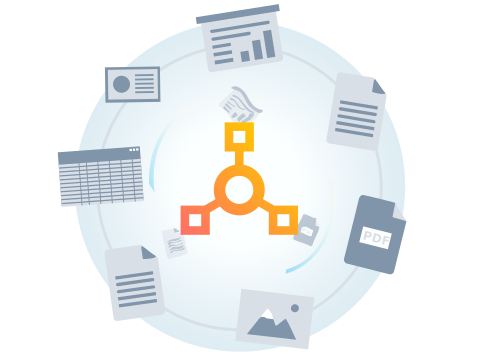
Achieve business‑wide flexibility with hybrid cloud capabilities that unify cloud, on‑prem, and private‑cloud print environments to modernize at your pace, simplify location management, and scale smoothly through mergers and expansions.
Simplified print administration
Automate printer discovery, driver management, and user provisioning from a centralized dashboard, reducing manual effort and helpdesk load.
Security with compliance-ready visibility
Support a Zero Trust approach with encrypted print jobs, centralized reporting, and audit trails to help meet requirements like GDPR/HIPAA across local and remote printing.
AI enabled efficiency
AI-driven assistant streamlines your administrative tasks, including setup, management, authentication, and workflow automation, enhancing ease and efficiency for IT admins.
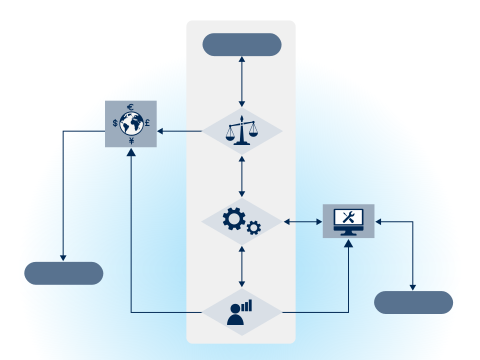
How Printix supports hybrid print end-to-end
Capabilities built for real hybrid environments
Secure by design
Printix is designed to protect documents without slowing users down:
- Single Sign-On with providers like Entra ID, Google Workspace, Okta, OneLogin
- Print jobs stay on the local network; documents encrypted and stored locally
- Monitor usage with tracking reports; document names visible only to the document owner
- GDPR compliant
Integrations that fit your IT stack
Microsoft ecosystem
SSO, deployment with Endpoint Manager, Entra ID groups, Azure Blob Storage, and Power BI support.
Google ecosystem
SSO, Google Groups, Google Cloud Storage, and Chromebook printing support.
Proven results that reduce cost and IT burden
Analyst recognition that reinforces confidence
Cloud print management allows you to send print jobs into the cloud, allowing you to use a device that’s connected to the cloud to print them remotely. Normally, you’d use on-site print servers to connect a device to a printer, but cloud printing allows you to print from any device that’s connected to the internet.
You can reduce costs and enforce document security with cloud printing, helping you conserve valuable resources that you can use to grow your business. Some cloud-based print management solutions even allow you to automate your workflow with AI.
Cloud printer management offers a simple solution to print management by eliminating print servers and enabling cloud-managed printing. Cloud-based printer management is particularly useful for remote workforces because it gives everyone in your organization the power to print securely from any device. You can also use cloud print management solutions to manage printing across multiple locations, reducing labor costs and eliminating security concerns. When you move your print management to the cloud, you have the power and flexibility to print from any device as long as you’re connected to the internet.
There are three types of cloud printing: public cloud, private cloud, and hybrid cloud. Public cloud-managed print services are available to anyone, which means they can be used by various organizations. Private cloud printing uses a dedicated service for one organization, and hybrid cloud combines aspects of private and public clouds.
Hybrid cloud support is one of the top reasons to choose Printix. Hybrid cloud print management allows you to take advantage of the benefits of both public and private cloud printing based on your needs, reducing costs and streamlining printing.
It’s important to look at features and benefits when you’re choosing a cloud print management solution. Printix offers a long list of features that reduce costs and streamline operations, including serverless architecture, simplified print management, and automatic printer discovery. With Print Later, you can queue documents for added flexibility. Printix also allows you to print from Android and iOS devices, and it can be used in combination with other tools like our PDF editor. If you want to reduce costs and eliminate the hassle of on-site print management, Printix is the simple solution.