PDF Editor Software: Power PDF
Create, convert, edit, share, and e-sign PDF documents in one place with our user-friendly PDF editor, Power PDF.
Break Free from Adobe’s Price Hikes and Save up to 60%
Over 15 Million users trust Power PDF, our award-winning PDF editor that’s easy to use, secure, and affordable. With a familiar, Office-style interface, you’ll be creating, converting and compiling PDF documents in minutes.
Advanced functionality, robust security, and redaction capabilities make Power PDF the perfect editor for individuals and businesses of all sizes.
Collaborate seamlessly with Power PDF Business - across desktop, browser, and Microsoft Teams
The newest generation of Power PDF Business enables teams to work on documents together, no matter where they are. With the Power PDF Cloud Editor, users can open and edit PDFs directly in their web browser — with no installation required. Whether you’re reviewing a contract, updating a proposal, or coordinating approvals, everyone stays aligned and in sync.
Bring collaboration right into your daily workflow with the Power PDF app for Microsoft Teams. Open, review, and comment on PDFs directly inside Teams and keep everyone moving forward — without file chaos or version confusion. Perfect for hybrid workplaces, distributed teams, and cross-functional projects that depend on clarity and shared context.
Collaboration features are included FREE with Power PDF Business.
Tungsten does not permanently store customer documents; files are retained only for the duration of the editing session.






See what Power PDF can do for you and your business
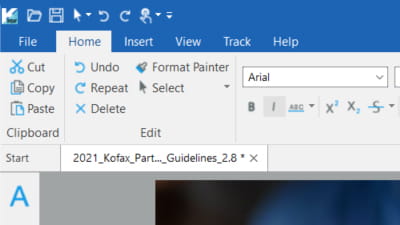
Easy to use
Office-style interface optimized for Windows 11 as well as Mac OS 10.15 through 26 (Tahoe).
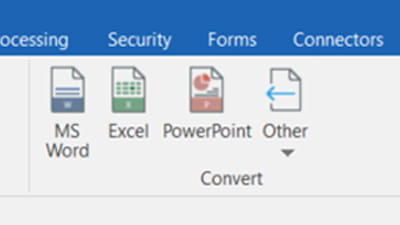
Power and flexibility
PDF ファイルを作成、編集し、Word、Excel、PowerPoint、JPG、HTML など、ほとんどすべてのファイルタイプに変換できます。
Integrated into Office
Easily convert to and from PDFs to Microsoft Word, Excel and PowerPoint files.
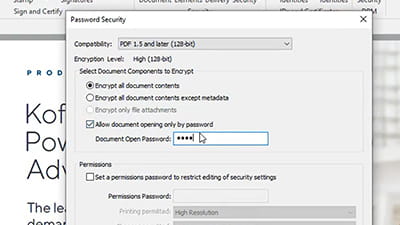
Keep your PDFs secure
安全な暗号化パスワードと権限を追加し、機密情報とプライベート・メタデータをマスキングします。
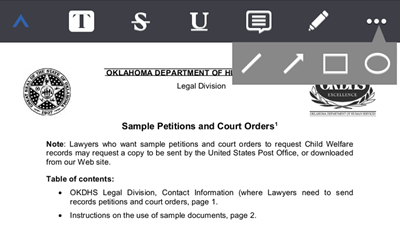
どこでも強力な PDF 編集
PDF の読み取り、注釈付け、マークアップ、署名、共有が可能な iOS および Android ユーザー向けのモバイル・サポート。
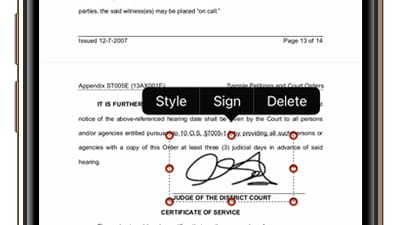
eSignatures made easy
Create and apply digital signatures. Add more eSignature features with Tungsten SignDoc (sold separately).
See how Power PDF excels in these industries





More secure, simple and affordable than Adobe. Switching to Power PDF is the smart choice.
-
- Native ARM Support
- Integrates with Sharepoint, iManage and more
- E-Signature capability
- バッチ処理
- Bates numbering/stamping
- Advanced redaction
- Password protection
- Plus everything in Power PDF Standard
-
- Minimum 5 users
- Citrix、Microsoft App-V、Windows Server 展開をサポート
- Access and edit your PDFs anywhere with the Cloud Editor
- Included app for Microsoft Teams
- Single admin to manage users, installs, security, updates
- Generative AI Copilots (bring your own OpenAI license)
- Custom and flexible configurations with SDK and API capabilities
- Extended support & updates
Easy to use PDF editing for home and small business users with no endless subscription fees.
-
- Native ARM Support
- Compatible with Microsoft Windows 8.1, 10, 11 (32 & 64 bit editions)
- Compatible with MS Office 2010-2019 and 365
- Powerful PDF creation, editing, exporting
- Easy to use Office-style interface
- Ideal for home users and typical PDF tasks
-
- Native ARM Support
- Integrates with Sharepoint, iManage and more
- E-Signature capability
- バッチ処理
- Bates numbering/stamping
- Advanced redaction
- Password protection
- Plus everything in Power PDF Standard
-
- Runs on Mac OS 10.15 through 26 (Tahoe)
- macOS-native, streamlined interface — minimal, modern, distraction-free
- Edit and annotate PDFs with highlights, comments and mark-ups
- Convert PDFs to Word, Excel and image formats with preserved layout
- Combine, split and organize pages to structure documents the way you need
- Fill out and sign forms digitally — no printing required
Compare all Power PDF editions







Prices shown in US dollars unless local currency shown. Subject to local taxes.

If you're not satisfied, we'll buy it back! Tungsten Automation offers a 30-day money back guarantee for the purchase price on Power PDF Advanced and Standard individual licenses purchased on tungstenautomation.com, beginning on date of purchase.
Power PDF is trusted by over 15 million users around the world






Power PDF はサブスクリプションですか?
Power PDF Advanced, Standard and Mac are perpetual, so once you buy a license, you own it forever with no additional monthly or annual fees.
Power PDF Business is available as a subscription which includes updates, upgrades, and extended tech support. Term and perpetual licensing also available.
What is Power PDF compatible with?
Power PDF Advanced and Standard versions 3.1 and higher are compatible with Windows 8.1 through 11 (32 and 64 bit), and the software is fully integrated with Office 365, so you can utilize the features of Power PDF from within your favorite Office apps including Word, PowerPoint and Excel.
Power PDF for Mac is compatible with all versions between 10.15 and 14.
Power PDF Business includes support for Citrix, Microsoft App-V and Windows Server deployment.
How Does Power PDF Compare to Adobe Acrobat?
Power PDF has been the top Acrobat alternative for many years, especially after Adobe moved to a subscription model.
- With an Office-style interface, it’s instantly familiar and easy to use
- Because Power PDF is not cloud-based, your documents are yours. There also won’t be the constant security patches and hacking risks that Adobe has.
- Power PDF costs significantly less, whether you’re using it at home or a global enterprise.
Learn more here or calculate how much you can save compared to an Adobe subscription
Power PDF のファイルをダウンロードするにはどうすればよいですか?
After your purchase is complete, you’ll be provided a link to download your Power PDF software from Verifone/2Checkout.com. This link is valid for two weeks only after purchase, unless you purchased download insurance which extends downloads to 24 months. Please download immediately and back it up in case you need to reinstall in the future.
Because this is a perpetual license of the version available on the day you purchase, Tungsten Technical Support may not provide any download links if you have an older version than the current version.
インストール中に問題が発生しました。どうすればよいですか?
When downloading and installing, please make sure to turn off any anti-virus software. Some strict programs will block download or incorrectly flag the Power PDF .exe file as a virus. You’ll also want to make sure you have enough storage on your computer.
購入後、アップデートやアップグレードを利用することはできますか?
Power PDF, PaperPort and OmniPage desktop products are perpetual licenses and not subscriptions. This means you own the specific version of software you bought on your date of purchase. With these retail individual licenses, there are no upgrades or updates included with the purchase.
To get a future upgrade, you will need to purchase the software again. Existing customers are eligible for generous upgrade discounts. Contact Technical Support or engage with a chat rep to get your discount code.
How do I move my license from one computer to another?
To transfer your Power PDF license, deactivate the license on your original computer by uninstalling the program. Then you can install on your new computer.
If you need assistance during this process, please contact Technical Support.
Power PDF ライセンスは何台のコンピューターにインストールできますか?
Power PDF Standard, Standard for Mac and Advanced are single licenses meant to be installed on your primary machine. Our EULA permits installation on a second machine for backup use. However, you can only use it on one machine at a time. If you get a new computer, please remember to uninstall so you can free up an activation. You may also contact Technical Support to assist with deactivating your old machine.
What's the difference in buying a license through TungstenAutomation.com versus a reseller such as Staples, Office Depot or CDW?
When you purchase through a reseller, you'll need to contact them directly for refunds and customer service. If you purchase through TungstenAutomation.com, you'll work with the Tungsten Automation team for refunds and customer service. In either case, the Tungsten Automation Technical Support team will provide technical support on the product.
If you received Power PDF, PaperPort or OmniPage with the purchase of a computer, scanner, printer or other device, you'll need to contact that manufacturer for all support.
返金ポリシーとは?
Tungsten Automation offers a 30-day money back guarantee on Power PDF, PaperPort and OmniPage individual licenses purchased only on TungstenAutomation.com. Simply reply to your confirmation email or send an email to esales@tungstenautomation.com within 30 days of your purchase with your order number and reason for cancellation. Your refund will be issued within one business day (it may take a few days for your credit card/bank to post it back to your account).
他の販売代理店や Web サイトからの購入は、30 日間の返金保証の対象にはならないため、返金ポリシーについては、購入した販売代理店に問い合わせる必要があります。
サポート・ポリシーとは?
Tungsten Automation offers a 90-day product support warranty from date of purchase on all desktop products, including Power PDF, PaperPort and OmniPage. This covers installation, setup, configuration and reinstallation of software during this period. There is limited support available beyond 90 days. Learn more about available coverage here.
試用版を利用するにはどうすればよいですか?
お試ししたい製品を選択し、15 日間の無料試用版にサインアップしてください。
無料試用版はどれくらいの期間利用できますか?
無料試用版は 15 日間利用可能です。この期間の後もソフトウェアを引き続き使用するには、ライセンスを購入する必要があります。
試用版ソフトウェアはフルライセンス版と同じですか?
はい。試用版ユーザーはすべての機能を利用できますが、15 日間という制限があります。
試用期間を延長することはできますか?
いいえ。試用版は一度しかインストールできません。試用期間の終了後、期間を延長したり、コンピューターに再インストールしたりする方法はありません。
試用版をインストールすると、期限切れと表示されます。なぜですか?
Trials can only be installed once which includes all older versions of trials. If you’ve previously installed Nuance Power PDF 2.0, for example, you can't install versions of Tungsten Power PDF on the same machine. You would need to install the trial on another device, or you can go ahead and purchase the license, as we have a 30-day money back guarantee. If software doesn’t meet your expectations, let us know and we’ll refund your payment in full.
クレジットカード情報を提供する必要はありますか?
いいえ、必要ありません。Power PDF の試用版は完全に無料です。ライセンスを購入したい場合は、いつでも購入できます。
インストール中に問題が発生しました。どうすればよいですか?
試用版をダウンロードしてインストールするときは、すべてのウイルス対策ソフトウェアをオフにしてください。一部の厳格なプログラムによって、ダウンロードがブロックされたり、Power PDF.exe ファイルが誤ってウイルスとみなされたりする場合があります。コンピューターに十分なストレージがあることを確認してください。
Power PDF の試用版をダウンロードしてシリアル番号を入力しましたが、機能しません。どうすればよいですか?
Serial numbers are issued for each version and edition of the software. If you downloaded the trial and attempt to apply the serial number from a previously purchased version of Power PDF, it won't work. Your option is to purchase a new license for the latest version. However, since you have an older serial number, you're eligible for a generous upgrade discount.
Mac 用の試用版を利用するにはどうすればよいですか?
Once you’ve installed the Power PDF for Mac software, click the “Demo” button on the startup screen to continue your trial. You do not need to enter a serial number until you purchase one.
Free tutorial videos and content on how to use your Power PDF
結合と分割
PDF から変換
セキュリティ

PDF Association
2010 年からのメンバーとして、Power PDF チームは PDF のグローバル・スタンダードの定義と、今後 PDF のベスト・プラクティスを進化させる方法を支援してきました。